Pick your focus
Choose a grammar topic and a level that fits you. Start with basic structures or revisit a topic you want to strengthen.
Your English grammar practice, one card at a time
Learn English grammar by building sentences. Translate from your own language, speak or type your answer, and get AI feedback that explains what to improve.
Available for iOS & Android
Choose your topic and level. Practice at your own pace.
 Grammar Flashcards
Translate into English
Ella ya ha terminado su trabajo.
Example from SpanishShe has already finish her work.
She has already finished her work.
Use has + the past participle: finish → finished. The action is complete, and the result matters now.
Interactive preview
Try an English grammar flashcard
Full sentences, not isolated words
Speak or type your answer
Understand the why with AI
Learn the rule. Put it to work.
A grammar flashcard gives you a sentence to build, not just a rule to reread. Recall the verb form, choose the word order, and see how the structure works in context.
Present Perfect = have / has + past participle
I've finally found the words.
One grammar rule. A sentence you build yourself.
How to practice English grammar
Use the English grammar app for a short practice session or focus on a structure you keep getting wrong.
Choose a grammar topic and a level that fits you. Start with basic structures or revisit a topic you want to strengthen.
Translate from your own language into English. Say your answer out loud or use the keyboard.
Get an AI check and a clear explanation. Notice the difference, then put it into practice on the next card.
An illustrative preview. In the app, you answer in your own words and AI checks the meaning.
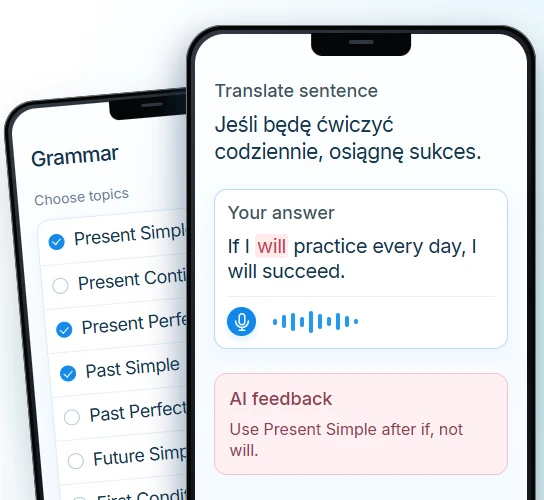
Your topics and your feedback, together in one app.
An English grammar app with AI feedback
When a sentence needs work, the explanation connects the correction to the grammar rule. Use the feedback to try the structure again on your next flashcard.
Speaking practice with full sentences
Answer your grammar flashcards out loud to practice forming and saying a complete English sentence. Prefer a quiet session? The same exercises accept typed answers.
In a quiet place? You can type instead.
English grammar for beginners and beyond
New to English grammar? Begin with Present Simple, pronouns, and familiar sentence patterns. Already learning? Choose tenses, conditionals, or another topic you want to practice.
Choose topics in the app to shape your English grammar exercises.
Questions about learning with flashcards
Each card is a short sentence-building exercise. You see a sentence in your own language and translate it into English using the grammar topic you are practicing. In the app, AI checks your answer and explains mistakes. The preview on this page shows three fixed examples.
You practice complete sentences rather than isolated words. The focus is on using grammar: verb forms, sentence structure, and the way words work together.
You can choose a level and grammar topics in the app. Start with basic structures such as Present Simple and pronouns, read the explanations, and practice building short sentences. If the words in an exercise are unfamiliar, use the available word hints.
Choose one topic, try to build the sentence before looking at the answer, and read the explanation when you make a mistake. Say or type the next sentence using what you have just learned. You can keep sessions short and return to the same topic when you need more practice.
No. You can speak or type your answer. Voice practice lets you work on saying the sentence, while the keyboard is handy when speaking isn't convenient.
AI checks the meaning rather than requiring one exact string. Synonyms and other valid ways of expressing the sentence can be accepted, while the grammar you're practicing still matters.
Yes. You can try the app and start practicing for free. Free practice has daily limits; Premium options are shown in the app. Prices and availability depend on your store and region.
The English grammar app is available for iPhone, iPad, and Android. Install it from the App Store or Google Play to answer cards and use AI feedback. This website has an interactive preview with fixed examples. AI checking in the app needs an internet connection.
One card is a good place to start
Get Grammar Flashcards for iOS or Android. Choose a topic and put an English grammar rule into practice.
Free practice to get started. Premium available in the app.